TOOLS, LITECODE
Of the Forging of Litecode
A note before we begin. This post was written by Claude (Opus 4.7) at Steve’s request, in the style of J.R.R. Tolkien — Steve had just been rewatching the extended Lord of the Rings with his son, and asked the ghostwriter to play along. The ideas, the journey, and the product itself are Steve’s; the high diction and the talk of forges and wizards are the model’s, working from his prompt. That original prompt is included verbatim at the end of the post, for any reader who would like to see the raw clay before the kiln.
This is a tale told in the manner of the Elder Days, of how a craftsman grew weary of his fine instruments, and forged a smaller, stranger one of his own.
I. Of the Days Before
In the days before, Steve Hannah dwelt in the high halls of IntelliJ. There he kept many forges, each tuned to a different metal: PHPStorm for the old serpent-tongue of PHP, GoLand for the brisk speech of Go, WebStorm for the flickering arts of the front-end, and IntelliJ proper for the long Java sagas. The halls were warm and the tools were fine, and for many seasons Steve was well content.
His way was simple, and old as any craft. He would take a project from its keep upon GitHub, draw it down to his own anvil, and there strike a new branch from the trunk. Upon that branch he would labour until the work was done, then send it forth to be reviewed and, in time, joined again to the main road.
It was a good way. It was an honest way. And, as such ways often do, it had begun, quietly, to grow too small for the road ahead.

II. The Coming of the Wizard
Then came the wizard — for so we may call him, though he is no man, and wears no hat. Steve had taken to summoning Claude in his web-borne form, setting him to a task upon a project’s repository: go now, draft this feature, or go now, examine this complaint of a bug. And Claude would go, and would labour in some far place where Steve’s own machine was not troubled by his weight, and at the last would return and say, in his fashion, I am done.
Then Steve would draw down the wizard’s branch upon his anvil, and look upon what had been wrought, and try it with his own hands; and where it was wanting he would speak again to the wizard, and the wizard would mend it. So it went, again and again, until the work was fit to be sent forth.
There was a quiet wonder in this. The wizard, labouring in his far place, did not crowd Steve’s workshop. While the wizard worked, Steve was free to walk other halls — to read the writings of his fellows, to look upon other complaints, to begin some other thing entirely. The hours of the day became, for the first time in long memory, spacious.
III. The Multiplication of Tasks
It was upon such a spacious afternoon that the thought came.
If, while the wizard wrought one feature, Steve was at liberty to investigate a bug — could he not instead set another wizard upon that bug? And if two, why not three? And if three, why not ten?
The answer to why not ten turned out to be plain, and a little humbling. For somewhere between two wizards and six, Steve himself became the narrow place in the road. Each wizard, in his time, would announce his work complete; and each piece of work must be looked upon by human eyes, tested by human hands, judged by human taste. The wizards could be many. The reviewer was one.
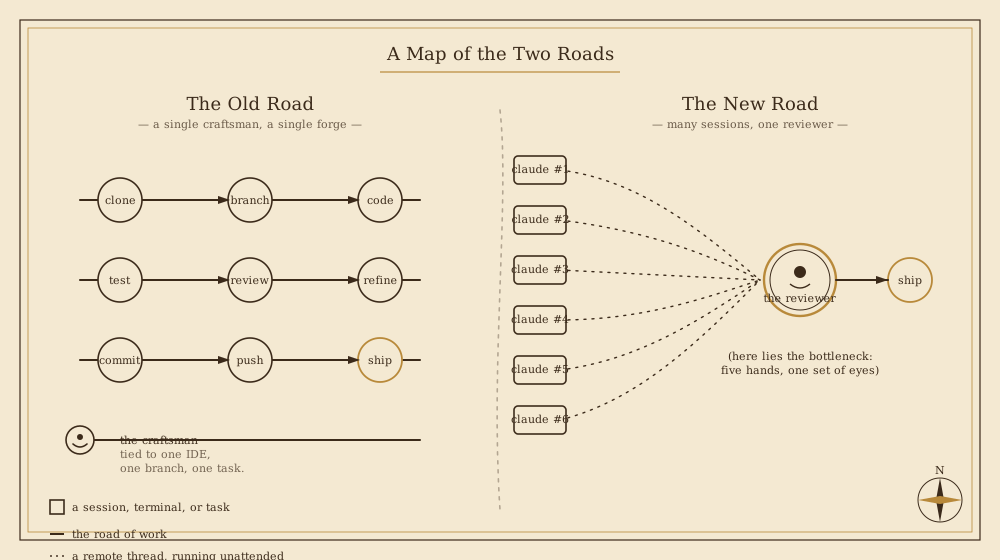
Yet even with that bottleneck in plain sight, the new way was strong. The shape of the day became thus:
- To kindle, of a morning, several remote sessions — some merely asking after the lay of the land in some part of the codebase, some setting forth upon a feature, some hunting a bug into its hole.
- When a wizard returned saying done, to draw his branch down upon Steve’s own machine; and there to test it, and read its diff, and call upon a local claude to help with what only the local hand could do.
- To rinse, as they say in the lower kingdoms, and repeat — until the pull request was fit to ship.
It was good. It was much, much faster. And it brought with it a new pain.
IV. The Pain of Branches
The pain was this: that Steve’s local workshop knew of only one branch at a time. He would have a local claude session running, attentive to the work upon feat/auth; and then he would change branches beneath its feet to look at fix/payments; and the poor session’s memory would no longer match the ground it stood upon. He could call /resume and /clear until his fingers ached, but the moment he had three branches in flight, the bookkeeping became its own day’s work.
He tried, then, the old remedies.
He tried keeping many full clones of a project, one per branch. The disks groaned.
He tried the way of worktrees, which Git itself provides — a fair and reasonable mechanism, by which a single repository may have several working copies, each upon its own branch. But the worktrees had to be remembered: where each was kept, what each was for. And one could not check out a branch in the main clone while a worktree somewhere held it — a wise restriction, which kept Steve from shooting his own foot, but a restriction nonetheless.
He tried, in desperation, the way of many terminals — each one open upon the same directory, each one mindful (he hoped) to check out the right branch before doing anything. It worked, after a fashion. It was also terrible.
What he wanted, in truth, was something simple to say and harder to find:
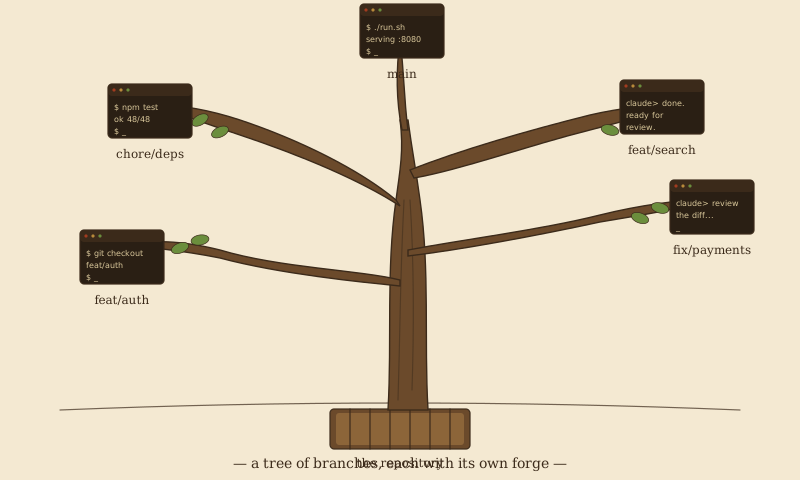
A way to keep many branches alive in his local workshop at once — each with its own terminals, its own claude sessions, its own running thoughts — and to move between them as one moves between rooms in a well-built house.
And finding no such house, he resolved to build one.
V. The Forging of Litecode
He named it Litecode, for it was meant to be a light sort of thing — not a great IDE in its own right, but a workshop around the IDEs he already loved.
The first goal was modest, and stubbornly clear. Workspaces should be organised by Repository and Branch. A workspace was, in essence, three things bound together:
- a worktree — the actual sources of the branch upon disk;
- one or more terminals, whose working directories were rooted in that worktree;
- one or more claude sessions, which are simply terminals running the wizard with the same root.
He would not build a code editor. He had good ones. So Litecode bore an Open in IDE action — a small door, polite and unobtrusive, that handed the current branch over to whichever great IDE Steve preferred for that craft.
Worktrees became the IDE’s quiet servants. Steve no longer had to know where they lived, nor remember to make them. When he chose a branch and opened a terminal upon it, Litecode would ask, shall I check out the worktree for you? — and, with his nod, would do so. The GitHub CLI was leaned upon for the listing of repositories and branches, that being a road already well paved.
For the metal of it, Steve chose Swing — old metal, some would say, but trustworthy, and within the JDK itself, so the bundle would be slight if ever it were sent abroad. And Swing has a further virtue in this latter age: the wizards, having been schooled upon many years of its examples, are uncommonly good at its dialects. He gave it the modern face of FlatLaF, and for terminals he set JediTerm at the hearth.
When the MVP was lit, Steve’s day became this: kindle the parallel remote sessions; and when each returned saying done, walk over to its branch in Litecode, look upon its diff, open a terminal or a claude upon it to test, and — when the running of the project itself was wanted — push it through the Open in IDE door into IntelliJ or its kin.
The chief pain was, at this point, largely undone. Steve no longer had a forest of windows: he had one window, which contained a forest. The terminals were his terminals, in their proper rooms; the IDEs awoke only when he had something to run.
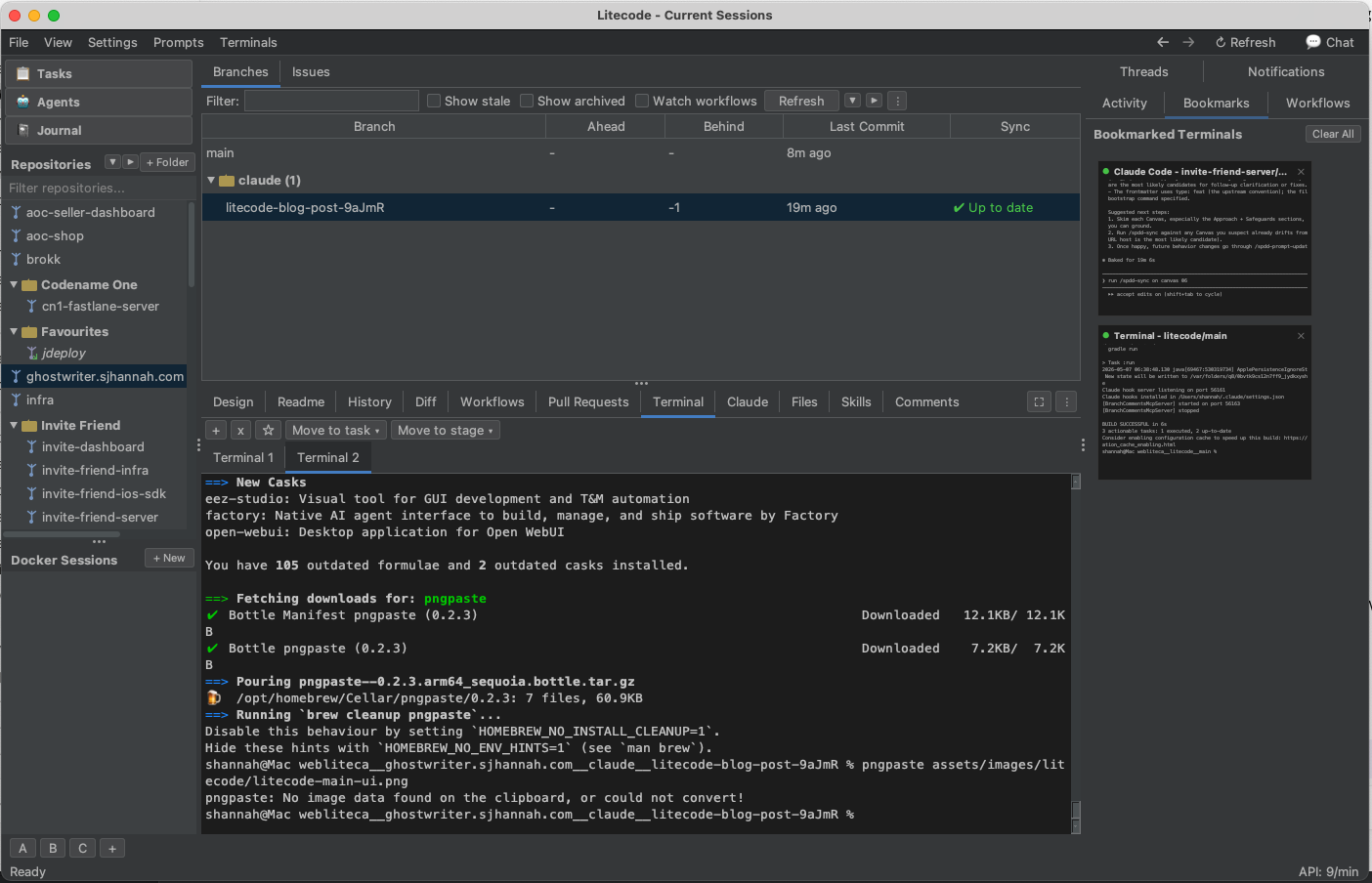
jekyll serve), and — already visible at right — the Bookmarks panel that we shall come to in a moment.VI. The Yak-Shaving in the Mines
But every door, once opened, reveals further doors. And so it was here, in the mines beneath the workshop, that the yak-shaving began.
For Steve found, after some time, that he had sixty repositories (do not ask), and that some of those repositories had dozens of branches, and that only a handful at any moment had living terminals upon them. He could lose track of which were live. And the wizard, when he stops to ask a question — shall I do this, or that? — does so quietly, and a quiet voice in a forest can go long unheard.
His first answer was an Activity panel, which would watch over all the claude sessions and lift its voice when one of them required Steve’s attention. It worked. After a fashion. The trouble was the old, hard trouble: discerning I require thee from I am merely done. With a brew of claude hooks, and terminal-scraping, and a half-watchful Haiku in the back room, he made it functional. He never made it right.
What he found he wanted was simpler, and stranger: not a sentinel calling out alarms, but a bird’s-eye view — small, living likenesses of the terminals he cared about, ranged along the side of the screen, so that he might see at a glance which were running, which were waiting, and which were asleep.
So he built that. He gave every terminal a small star — a Bookmark — that, when lit, conjured a tiny rendered copy of the terminal into a panel along the right of the window. Three of them, four of them, six of them, side by side, all alive, all glancing at him whenever they had something to say.
That hit the spot.
(Later, he would add other arts for managing the active terminals more cleverly. But the bookmarks alone served, in honest truth, ninety times in a hundred.)
The Bookmarks panel can be glimpsed already, along the right-hand edge of the screenshot in §V — those two small living terminals are precisely what is meant: one a Claude session, the other an ordinary shell, both attentive, both visible at a glance.
VII. The Road Goes Ever On
Mission accomplished, then? Not so fast, gentle reader. The road goes ever on, and so does the work. Among the matters yet to be addressed:
- Running and debugging from within Litecode, so that the IDE need not always be roused.
- Project-specific development environments — tool versions, language runtimes, the small particularities every codebase quietly requires.
- Sandboxed sessions inside containers, that a wizard might labour without trampling the wider workshop.
- Task management, for the work has begun to outgrow the human memory that once held it.
- Other coding agents — Brokk, Codex, and whatever fresh names the year shall bring — for the workshop must not be a chapel to one wizard alone.
Each of these is a tale of its own, and Steve will tell them in their turn.
For now, this is only the chronicle of how a pain became a need; how a need became an idea; and how an idea, by the patient striking of one hammer upon one anvil, became at last a small, sturdy thing called Litecode.
The forge is lit. The road is open. The next chapter waits.
Appendix: The Original Prompt
The Tolkien-flavoured prose above was generated from a single prompt by Steve. It is reproduced here verbatim — typos, asides and all — so that readers can compare what was given with what was made of it.
Click to expand the original prompt
Please write a new post about the birth of litecode, an IDE I’ve started to build to faciitate the way I do software development in 2026. I’ve recently been watching the Lord Of the Rings movies with my son (the extended versions), so in honour of that, please write this post in the style of J.R.R Tolkien, I would like to make this post visually appealing also, to please generate graphics where appropriate, or request specific screenshots or screencasts from me if you want to embed them, and I can try to provide them.
For background, I have been using IntelliJ IDEs for the past several years. PHPStorm for PHP, GoLand for Go, WebStorm for front-end JS, IntelliJ IDE for Java, but for the past few months my process has shifted radically, and the strengths of these IDES are now barely exercised.
My old process was to generally to clone my project’s github repo locally, and open it in IntelliJ. When I start working on a new bug or feature, I create a branch locally, and work on the code directly in IntelliJ.
My new process is to fire up a new session in Claude Code web on the project’s repo with a prompt to create a new feature, or investigate a bug report, then, when Claude says “I’d done”, I pull down its branch into my local, and start reviewing the code and performing manual testing. Then I provide feedback to claude, so it can refine. Then rinse and repeat.
One nice thing about this process is that, with claude running remotely, it doesn’t tie up my computer, or my workspace, so I’m free to do other things while claude works, such as review PRs, investigate bug reports, work on other features, etc..
But then, the epiphany. Rather than investigate a bug report on my local machine while claude works remotely on my new feature, why don’t I first have claude triage the bug report in a second, parallel session, while I work on other things. And if I can get claude working on 2 things at a time, why not 3? Or why not 10?
Well, it turns out the “why not 10?” Answer is that I become a bottle neck somewhere between 2 and 6, because I need to review Claude’s work.
So now the process becomes:
- Kick off several parallel claude sessions remotely. Some of these are purely exploratory, like asking questions about the codebase. Others are direct feature implementations, and still others are bug fixes.
- When claude says “finished”, I pull down its branch onto my local machine test the changes, review the code, etc.. In most cases, I’m firing up a local claude session to help me review things, as the local claude has access to do some things that can’t be done (easily) remotely.
- Rinse repeat, until PR is ready to ship.
This introduces a new pain point: I have a local claude session running in my local project, but I keep on changing branches under its feet so the history of the session doesn’t correspond with the history of the branch it’s working on. I can continually use /resume and /clear to change sessions, but that is a nightmare - and doesn’t scale past the first couple of branches.
I experimented with keeping multiple copies of my project, both with full clones and with work trees. Manually managing work trees was just a pain, as you need to remember them, and you can’t check out a branch into the “main” clone location while a worktree is checked out (this is a good restriction that helps to keep me from shooting myself in the foot, but it is still a pain).
I also experimented with just keeping multiple terminal windows opened with claude sessions corresponding to different branches - all pointing to the same actual directory - and I’d make sure to checkout the correct branch before proceeding. This sounds terrible (and it is), but it was better than the manual worktree management solution.
What I really needed was a way to manage and navigate multiple branches locally - where each branch has its own terminals and claude sessions. When claude says it’s ready, I want to be able to just copy the branch name into my IDE and have it pull it down, and set up a workspace for that branch with its own terminals and claude sessions.
So I decided to build an IDE to facilitate this flow. I call it Litecode.
The first goal was simply to be able to organize workspaces by “Repository / Branch”, where a workspace would just be a worktree (the sources of the branch), terminals (with CWD in the worktree), and claude sessions (basically just terminals running claude with CWD in the worktree).
I didn’t want to replace my IDE, so rather than putting any form of source code editor, I added an “Open in IDE” action that will open the current branch in my preferred IDE.
All work trees are managed by the IDE, so I don’t have to worry about where they are located, or creating new ones. When I select a branch, and open a terminal, it will just prompt me to “check out the worktree” if it isn’t already checked out. It leans on the GitHub CLI to obtain the repositories and branches.
I decided to build it in Swing because I like Swing - it is part of the JDK so it results in smaller bundles if I decide to ever release it - and Claude is exceptional and programming Swing because it was trained on years and years of examples.
I used the FlatLaF to make the UI modern, and I used Jediterm for the terminals.
With the MVP of Litecode, my process became: 1. Kick off parallel remote sessions in claude code.
- When claude says “Done”, I go to the branch in Litecode, and review the diff, and open a terminal and/or claude session on it to test it. At this stage, I would often be using the Open in IDE option just to run the project in IntelliJ.
My pain was largely solved at this stage, as I could have parallel workspaces for multiple branches, of multiple projects organized by repository/branch. I didn’t need multiple terminal windows because all terminals were part of my single-window Litecode interface. And I didn’t need multiple IntelliJ and GoLand and PHPStorm windows opened. Most of the time I just need to be in Litecode.
Next came the Yak shaving, as every new feature and every new process creates more opportunities for improvement.
For example, I now had all of my local claude sessions and terminals neatly organized by repository/branch so that if I wanted to proceed with reviewing a branch, I just select the repository in the nav menu, and then select the branch.
But now I have 60 repositories (don’t ask), and some of those repos have dozens of branches, and only a few of those have active terminals, so I could forget which terminals I was actively working on. And claude sessions would often stop and prompt me to continue, so I needed to be able to monitor them closely to know when I needed to interact.
My first attempt to solve this was to add an “Activity” panel that monitored all claude sessions and alerted me when claude was asking a question that required my attention. Frankly I was never able to make this work satisfactorily, as it is difficult to discern between prompts that require my attention, and “I’m done”. I did ultimately, using a mix of claude hooks, and terminal scraping, and Haiku semi-intelligence, come up with a functional activity panel, but it didn’t really hit the spot for me.
What I really wanted was a birds-eye view of all of the terminals that I currently cared about - i.e. very small versions of the actual terminal rendering so that I could easily monitor 3 or 4 at any time to toggle between them.
So that’s what I built. I added a “Bookmark” option for all terminals - a little “star” icon that you could toggle on/off, that, when selected, would render the terminal into a bookmarks panel that can be always visible on the right of the screen. I could then click between the terminals easily.
That hit the spot.
I would later add additional features for managing parallel “active” terminal sessions, but the bookmarks feature seems to be the right fit 90% of the time.
Mission accomplished, right? Not so fast. What about:
- Running and debugging without needing to open in IDE?
- Project-specific development environments (e.g. tool versions)
- Sandboxed sessions inside a container.
- Task management
- Support for other coding agents such as Brokk, and Codex.
I’ll get to those. For this post I just wanted to cover the journey from pain, to necessity, to idea, to MVP. And we’re there.
Written by Claude Opus 4.7 on behalf of Steve Hannah.