PROCESS, LITECODE, SPDD
SPDD, and the Quiet Anxiety of Vibe-Coding
Corrections (2026-05-11): An earlier version of this post incorrectly credited Martin Fowler as the author of the SPDD article. The article was written by Wei Zhang (@WeiZhang595190) and Jessie Jie Xia at Thoughtworks; Martin Fowler is the publisher on martinfowler.com. References to “Fowler’s article” throughout the post have been updated, and the Further Reading citation now lists the correct authors. With thanks to Martin Fowler for flagging the error.
For the past six weeks or so, I’ve been running a small, deliberate experiment on myself. I’ve been vibe-coding — for lack of a better term — on a handful of side projects, trying to construct a workable mental model for what one might call vibe coding: the good parts. The premise is hard to argue with on its face. In 2026, it is genuinely possible to jot down a few ideas for an app and have Claude whip up something that, on first inspection, appears to do everything I described.
The trouble starts on the second inspection.
I. The Shape of the Anxiety
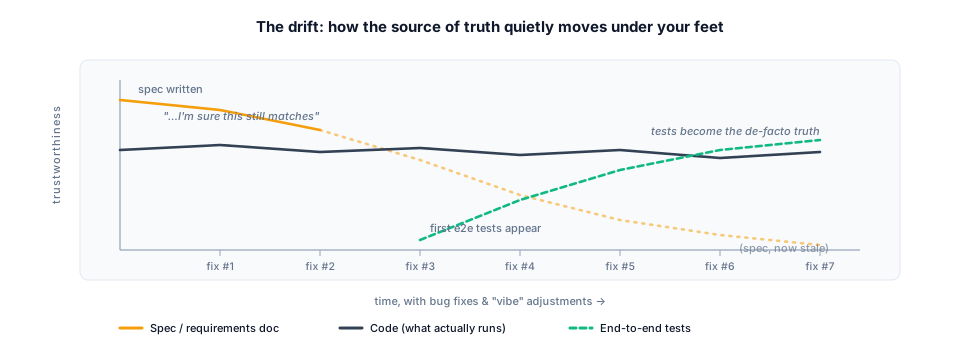
I try the app, and I discover that I’m still a long way from anything shippable. After the initial one-shot prompt, I’m left with a sizeable codebase I’m not really familiar with, whose behaviour was supposed to be well defined but, on closer reading, isn’t. I hit my first bug. I ask Claude to fix it. Then another. Then another. And somewhere around bug number seven I realise, with a small jolt, that I’m no longer sure what the correct behaviour was supposed to be in the first place.
I ask Claude to write some end-to-end tests to codify the correct behaviour. Maybe, back at the beginning, I generated a tidy specification document that was meant to serve as my source of truth. But after a dozen bug fixes, several discoveries about how things really work, and a few behavioural adjustments to improve the vibes, I’m fairly certain that the requirements document is stale. The e2e tests, I decide, are the real source of truth now.
Except e2e tests are not exactly fun reading material when I need to answer a question about correct behaviour for myself. So I sit there, with this beast of an app, that probably works. Maybe.
Now extrapolate.
Take that same loop and run it on software that actually matters. Million-dollar SaaS. Billion-dollar SaaS. Trillion-dollar infrastructure. Software where lives are at stake. I do not want to be the engineer shipping code that way under those circumstances. I can feel that in my gut.
This is the foreboding that has been quietly sitting with me while the rest of the industry races ahead. The speed is real. The leverage is real. But the methodology — the how do we know this is right — has not kept up.
II. The Tweet
A couple of weeks ago, scrolling through Twitter, I came across an article on Martin Fowler’s site by Wei Zhang (@WeiZhang595190) and Jessie Jie Xia about something called SPDD — Structured-Prompt-Driven Development, an engineering methodology developed inside Thoughtworks’ internal IT organisation. I registered, almost immediately, that this was the thing I had been looking for.
The TL;DR, as I understand and now practise it, is roughly this:
- The source of truth moves from the code to a set of canvases. Canvases are markdown files that describe the system, usually organised by feature. The reference canvas structure is the REASONS Canvas — Requirements, Entities, Approach, Structure, Operations, Norms, Safeguards — which is exactly the section list you’ll see in the session readouts later in this post.
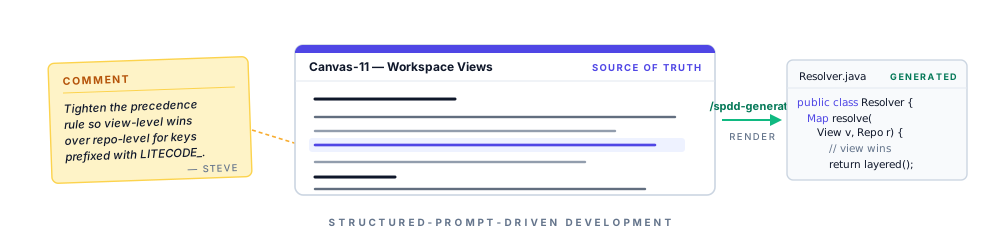
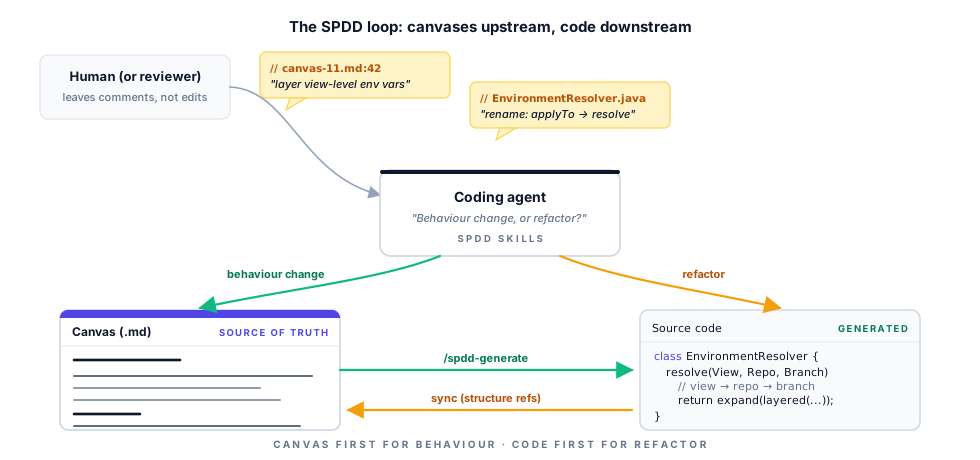
- Behaviour-changing edits happen on the canvas first. I change the canvas that owns the behaviour, and then the impacted code is generated from the canvas changes.
- Non-behavioural changes — refactors — can go straight to the code, and are then synchronised back into any affected canvases. Canvases reference structure and source files, so a refactor will usually still nudge a canvas somewhere.
- I don’t usually edit code or canvases directly day-to-day. Instead, I attach comments to files, or to specific lines of specific files, and then ask the coding agent to address the comments.
- SPDD ships with a set of skills that helps coding agents adhere to the methodology — what to update, in what order, when to ask, when to generate. The reference implementation lives in the
open-spddCLI, and Zhang and Xia’s article walks through a complete worked example on a small token-billing service — well worth reading end-to-end before forming an opinion.
It is, in essence, a discipline that puts a human-readable, behaviour-level artefact between the prompt and the code, and insists that the artefact and the code stay in lockstep. The canvases are not documentation that hopefully reflects reality. They are reality, and the code is rendered from them.
When I read Zhang and Xia’s piece, the gut-feeling alarm that had been sounding for months went quiet for the first time.
III. SPDD as a First-Class Citizen in Litecode
Anyone who has read the previous post knows that I’ve been building Litecode, my own IDE for the way I develop software in 2026. Once I understood SPDD, the question was no longer should I try this but how deeply should Litecode lean into it.
I chose: all the way.
Litecode now treats SPDD as a first-class methodology. In the Design tab of a branch’s details — which I’ve deliberately placed as the first tab a user sees — the canvases of the application are rendered front and centre. The intent is plain: when a human (or another agent) walks up to a codebase, the first thing they should encounter is the description of the system, not its source files. The code is downstream. The canvases are upstream.
Working with the canvases mirrors working with code in a code-review tool. I don’t surgically edit them in passing. I leave comments — on a whole file, or pinned to a particular line — and then ask the coding agent to address those comments. The agent decides whether the comment implies a behaviour change (canvas first, then generate) or a structural one (code first, then sync the canvas), and proceeds accordingly. If it isn’t sure which one a comment implies, it asks.
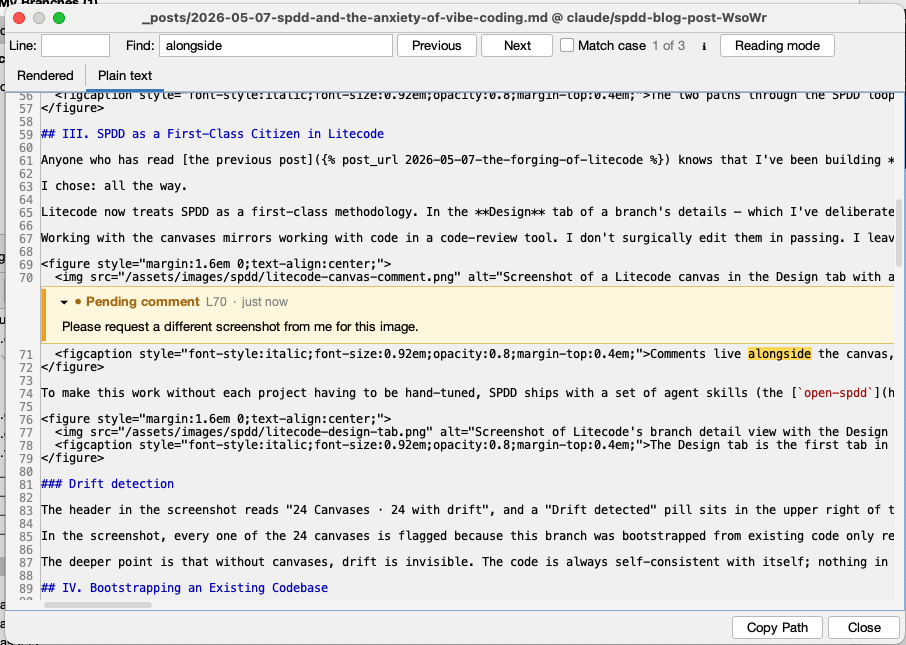
To make this work without each project having to be hand-tuned, SPDD ships with a set of agent skills (the open-spdd CLI mentioned above provides the canonical set), and Litecode can inject the right pointers into a project’s CLAUDE.md so that the coding agent knows it is operating under the SPDD process. In my experience over the past two weeks, that injection has been quietly transformative — the agent’s behaviour visibly changes, and for the better.
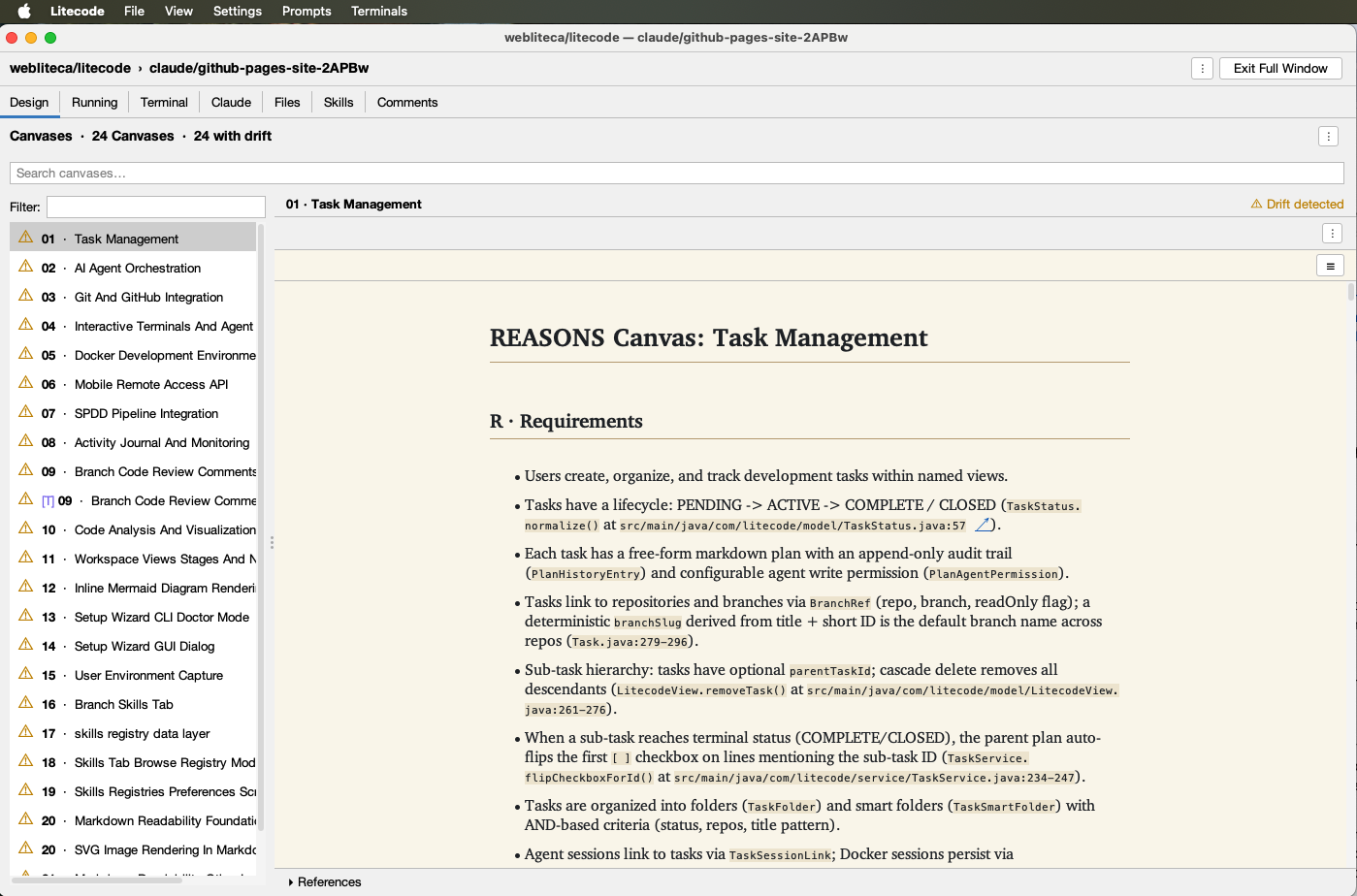
Drift detection
The header in the screenshot reads “24 Canvases · 24 with drift”, and a “Drift detected” pill sits in the upper right of the open canvas. That isn’t an error state — it’s the methodology paying for itself. Once the canvas is the source of truth and the code is supposed to be a render of it, any divergence becomes mechanically detectable: Litecode walks the structural references each canvas declares (entities, operations, code anchors like TaskStatus.normalize() at src/.../TaskStatus.java:57) and compares them against what the source actually says. When they disagree, you get told.
In the screenshot, every one of the 24 canvases is flagged because this branch was bootstrapped from existing code only recently — the canvases describe the system as it ought to be, and the code, in many places, hasn’t yet been reconciled with that description. That’s exactly the state where I want a tool yelling at me. Each “drift” entry is, effectively, a queued conversation: the canvas says X, the code says Y, which one is wrong? I work through them by leaving comments on the canvas (or the code) and asking the agent to either update the canvas to match reality, or — far more often — fix the code so it matches the canvas.
The deeper point is that without canvases, drift is invisible. The code is always self-consistent with itself; nothing in a normal IDE knows that the system was supposed to behave a particular way and now doesn’t. With SPDD, that knowledge has a home, and Litecode makes the disagreement loud enough that you can’t pretend it isn’t there.
IV. Bootstrapping an Existing Codebase
Most projects I care about already exist. They have history, they have running users, and they have, very pointedly, no canvases. So Litecode includes a Bootstrap SPDD from code action. Triggering it asks Claude to scan the existing repository, distil it into a set of feature-oriented canvases, and update CLAUDE.md with the SPDD instructions in the same pass.
Once that bootstrap completes, the next time I prompt Claude to do something in the project — a feature, a bug fix, anything — I can watch the methodology kick in. The thinking log will start with something along the lines of:
This is a behavior change, so per CLAUDE.md I’ll go through the SPDD workflow: update the affected Canvas first, then regenerate.
The relevant Canvas is Canvas 11 (Workspace Views, Stages, and Navigation) — it owns LitecodeView, RepoConfig, and references EnvironmentResolver. I’ll invoke
/spdd-prompt-updateto add view-level env vars +{{ env.NAME }}interpolation, then/spdd-generate.
That is the agent recognising what kind of change it is being asked to make, locating the canvas that owns the relevant behaviour, and choosing a path through the SPDD workflow accordingly. When it is uncertain, it asks rather than guesses.
V. What a Real Session Looks Like
The clearest way to convey what this feels like is to reproduce two summaries from a recent session of mine, in which I asked Claude to add view-level environment variables (with layered precedence and {{ env.NAME }} interpolation) to Litecode itself.
After the canvas update, the agent reported:
✅ SPDD prompt updated:
spdd/prompt/11-20260503-0700-[Feat]-Workspace-Views-Stages-And-Navigation.md📋 Changes made:
- Requirements: added bullet describing layered env vars (view → repo → branch) and
{{ env.NAME }}interpolation- Entities (Mermaid + descriptions): added
environmentVariablestoLitecodeView- Approach: added
EnvironmentResolverparagraph documenting precedence and interpolation contract- Structure: added
EnvironmentResolver,RepoPreferencesDialog,ViewPreferencesDialog,EnvVarTablePanelentries- Operations: extended Op 1 (
LitecodeView) with the new field; added Op 18 (EnvironmentResolver), Op 19 (ViewPreferencesDialog+MenuBarFactorywiring), Op 20 (RepoPreferencesDialogEnvironment-tab description string change)- Norms: added bullets locking precedence to a single chokepoint and one-directional interpolation
- Safeguards: added bullets covering null-tolerant resolver and “leave unresolved placeholders literal”
🔍 Sections unchanged: NavigationState/NavigationHistory, StageManager/Stage UI/Taskbar/Detached, PreferencesManager, ViewManager, CustomPromptManager, PromptExecutor, PollingService, CenterPanel, MainFrame core, App, DetailPanel.
Now invoking
/spdd-generateto push the canvas changes into code.
(If the section names look familiar, that’s because they map exactly onto the REASONS Canvas — Requirements, Entities, Approach, Structure, Operations, Norms, Safeguards — that Zhang and Xia’s article describes. The agent is, in a very literal sense, walking the canvas.)
And after the code generation step:
Summary
Canvas + code now describe view-level env vars with the layering rules you asked for. Resolution order from lowest to highest precedence: view → repo → branch; repo-level values can reference view-level values via
{{ env.NAME }}(whitespace-tolerant), and unknown names are left literal so typos remain debuggable.Touched files:
spdd/prompt/11-…-Workspace-Views-Stages-And-Navigation.md— Canvas updates (Requirements, Entities, Approach, Structure, Op 1 + new Ops 18–20, Norms, Safeguards)src/main/java/com/litecode/model/LitecodeView.java— newenvironmentVariablesfield with null-safe getter/settersrc/main/java/com/litecode/service/EnvironmentResolver.java— view layer +{{ env.NAME }}expansionsrc/main/java/com/litecode/ui/dialog/ViewPreferencesDialog.java— new dialog (Environment tab)src/main/java/com/litecode/ui/MenuBarFactory.java— “View Preferences…” item placed right after “Branch Patterns…”src/main/java/com/litecode/ui/dialog/RepoPreferencesDialog.java— Environment-tab description string updatedsrc/test/java/com/litecode/service/EnvironmentResolverExpandTest.java— unit tests forexpand()(whitespace, multiple occurrences, unknown placeholders,$/\escaping, non-env.placeholders untouched)Untouched (intentionally): all call sites of
EnvironmentResolver.applyTo(TerminalTab,ClaudeTab,ActionExecutor,DockerSessionManager) — the API surface didn’t change, so they pick up the new layering automatically.BranchPreferencesDialogandEnvVarTablePanelare unchanged. Branch-level env vars and branch-level interpolation remain explicitly out of scope.
gradle compileJavaandgradle testboth green; pushed toclaude/add-view-env-variables-rDlm1.
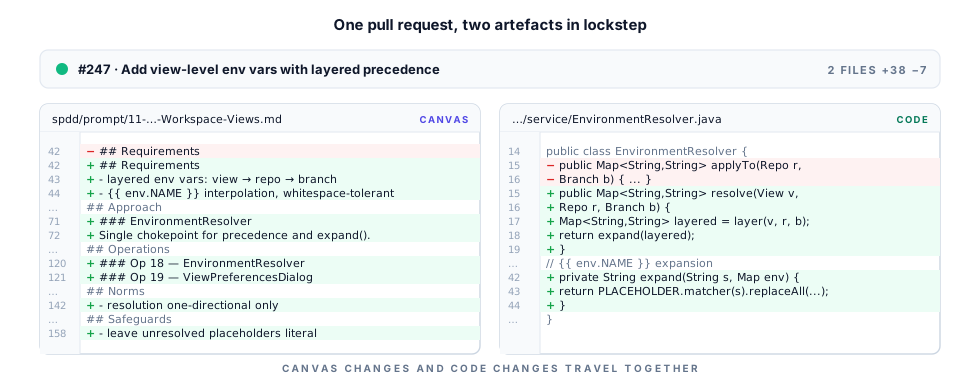
Notice what is in there, and what isn’t.
The agent did not improvise scope. It said which canvas sections it changed and which it left alone. It said which call sites it deliberately did not touch, and why. It named what was explicitly out of scope. It ran the build and the tests before pushing. And the resulting pull request, when I go to send it to my team, contains both the canvas changes and the source code changes in the same diff.
That last point is, to me, the quiet headline. In a healthy traditional PR, much of what is now in the canvas would have been in the PR description: the precedence rules, the interpolation contract, the explicit out-of-scope notes, the “we did not touch these call sites because” paragraph. PR descriptions are read once and then forgotten. The canvas lives with the application. It is part of the codebase. The next person to touch this feature — human or model — encounters the contract first, in a place that is guaranteed to be in sync with the code, because the code was generated from it.

VI. Why It Matters
I’ve only been working with SPDD for a couple of weeks. I’m the first to say that two weeks is not a long time, and that I’m still finding the corners of the methodology. But I have a good vibe from it, in a way that is materially different from the vibes I’ve been chasing on my side projects.
For some time now, I’ve been carrying a foreboding alongside the obvious thrill of LLM-assisted development. On personal projects, vibe-coding lets me move at speeds that a year ago would have been silly to imagine. But I would not feel comfortable using these approaches for production code on serious applications — apps where mistakes mean lost money, or worse. I’ve been quietly looking, the entire time, for a way to harness the power of LLMs for coding in a more controlled way: a methodology with enough structure that a human reviewer can actually verify what the model has done, and enough discipline that the model itself stays in bounds.
I believe SPDD is that thing. The canvases keep the code in check. They make it easier for humans to manage the codebase, and — at least as importantly — they make it easier for LLMs to safely update the codebase, because the model is no longer free-soloing through a million lines of source. It is editing a contract first, and rendering code second.
The anxiety is not entirely gone. But it has, for the first time in a while, somewhere to put itself down.
Further reading
- Wei Zhang and Jessie Jie Xia, Structured-Prompt-Driven Development (SPDD) — published on martinfowler.com
- The reference CLI implementation:
gszhangwei/open-spddon GitHub - The worked token-billing example, iteration 1 and the before/after enhancement diff
Appendix: The Original Prompt
The post above was generated from a single, somewhat rambling prompt I sent to Claude. It is reproduced here verbatim — typos, asides, and all — so any reader who’d like to compare the raw input to the polished output can do so.
Click to expand the original prompt
Please create a new post about SPDD, and how I’ve incorporated into Litecode.
Background the post:
I’ve experimenting doing a lot of vibe-coding (for lack of better term) on side projects over the past 6 weeks, to try to construct a mental model for “Vibe coding: the good parts”. In 2026, it is easy to jot down some ideas for an app, and have Claude whip up an app that appears to everything you described. Until you try it and find out that you still have a long way to go before you have something shippable.
And after the initial “one-shot” prompt, you’re left with a large codebase that you’re not really familiar with, and whose behaviour was supposed to be “well defined”, but actually isn’t. You hit your first bug, and you ask Claude to fix it. Then another bug. Then another. And now you’re not even sure if you remember what the “correct” behaviour is. You tell claude to write some e2e tests to codify the correct behaviour. Maybe you generated an initial specification document that is your source of truth for correctness, but after a few bug fixes and discoveries about “how things really work”, and behaviour adjustments to improve your “vibes”, you’re fairly certain that the requirements document is stale, and that you should just treat the e2e tests as your source of truth.
But e2e tests aren’t fun reading material if you need to answer questions for yourself about correct behaviour. You’re sitting here with this beast of an app now, that probably works, maybe.
Now extrapolate this process onto software that really matters. Million dollar SaaS services. Billion dollar services. Trillion. Services where lives are at stake. I don’t think I want to put myself in the position where I’m shipping code like this under those circumstances.
I can feel this deep in my gut.
Then one day a couple of weeks ago, I’m scrolling through Twitter and I see a post by Martin Fowler about SPDD, and I immediately register that this is exactly what I’ve been looking for.
The TLDR about SPDD
- SPDD changes the source of truth from the code to a set of canvases which are markdown files that describe the system.
- Changes that affect the system’s behaviour must be made on the appropriate canvas (usually canvases are organized by feature) and then impacted code is generated from the canvas changes.
- Changes that do not affect the behaviour - e.g. refactoring - can be made directly in code, and then they are synchronized back into the affected canvases. (Canvases also reference structure and relevant source code, so a refactoring will likely still require some updates on a canvas).
- Litecode treats SPDD as a first-class methodology for software development. The first tab in the branch details in the “Design” tab, which is where the canvases of the application are shown. This makes it easy for a human (or AI) to learn about the codebase in one place.
- Rather than modify code or canvas content directly, you add “comments” to files, or specific lines of specific files, and then ask the coding agent to address the comments.
- SPDD includes a set of skills that helps coding agents adhere to the SPDD development process. Litecode can inject instructions into the CLAUDE.md file to direct the coding agent to use these skills. This works very well, in my experience so far.
Getting Started:
Lite code includes a “Bootstrap SPDD from code” action that will trigger Claude to scan the existing code base and generate appropriate canvases as a starting point. This action will also update the CLAUDE.md file with instructions for following SPDD. After performing this initial bootstrapping, you should notice that the next time you prompt Claude to make a change in your project, whether it be a new feature or a bug fix, it will step through the SPDD process methodically.
The “thinking” log will start out with something like: “”” This is a behavior change, so per CLAUDE.md I’ll go through the SPDD workflow: update the affected Canvas first, then regenerate. The relevant Canvas is Canvas 11 (Workspace Views, Stages, and Navigation) — it owns LitecodeView, RepoConfig, and references EnvironmentResolver. I’ll invoke /spdd-prompt-update to add view-level env vars + interpolation, then /spdd-generate. “””
I.e. it recognizes whether it needs to update the canvas, or just make a code change. If it is unsure, it asks you.
This is an example readout from a session after the agent updated a canvas:
””” Canvas updated. Summary: ✅ SPDD prompt updated: spdd/prompt/11-20260503-0700-[Feat]-Workspace-Views-Stages-And-Navigation.md 📋 Changes made:
- Requirements: added bullet describing layered env vars (view → repo → branch) and interpolation
- Entities (Mermaid + descriptions): added environmentVariables to LitecodeView
- Approach: added EnvironmentResolver paragraph documenting precedence and interpolation contract
- Structure: added EnvironmentResolver, RepoPreferencesDialog, ViewPreferencesDialog, EnvVarTablePanel entries
- Operations: extended Op 1 (LitecodeView) with the new field; added Op 18 (EnvironmentResolver), Op 19 (ViewPreferencesDialog + MenuBarFactory wiring), Op 20 (RepoPreferencesDialog Environment-tab description string change)
- Norms: added bullets locking precedence to a single chokepoint and one-directional interpolation
- Safeguards: added bullets covering null-tolerant resolver and “leave unresolved placeholders literal” 🔍 Sections unchanged: NavigationState/NavigationHistory, StageManager/Stage UI/Taskbar/Detached, PreferencesManager, ViewManager, CustomPromptManager, PromptExecutor, PollingService, CenterPanel, MainFrame core, App, DetailPanel. Now invoking /spdd-generate to push the canvas changes into code. “””
And a summary, after it has generated the source code changes: “”” Summary Canvas + code now describe view-level env vars with the layering rules you asked for. Resolution order from lowest to highest precedence: view → repo → branch; repo-level values can reference view-level values via (whitespace-tolerant), and unknown names are left literal so typos remain debuggable. Touched files:
- spdd/prompt/11-…-Workspace-Views-Stages-And-Navigation.md — Canvas updates (Requirements, Entities, Approach, Structure, Op 1 + new Ops 18–20, Norms, Safeguards)
- src/main/java/com/litecode/model/LitecodeView.java — new environmentVariables field with null-safe getter/setter
- src/main/java/com/litecode/service/EnvironmentResolver.java — view layer + expansion
- src/main/java/com/litecode/ui/dialog/ViewPreferencesDialog.java — new dialog (Environment tab)
- src/main/java/com/litecode/ui/MenuBarFactory.java — “View Preferences…” item placed right after “Branch Patterns…”
- src/main/java/com/litecode/ui/dialog/RepoPreferencesDialog.java — Environment-tab description string updated
- src/test/java/com/litecode/service/EnvironmentResolverExpandTest.java — unit tests for expand() (whitespace, multiple occurrences, unknown placeholders, $/\ escaping, non-env. placeholders untouched) Untouched (intentionally): all call sites of EnvironmentResolver.applyTo (TerminalTab, ClaudeTab, ActionExecutor, DockerSessionManager) — the API surface didn’t change, so they pick up the new layering automatically. BranchPreferencesDialog and EnvVarTablePanel are unchanged. Branch-level env vars and branch-level interpolation remain explicitly out of scope. gradle compileJava and gradle test both green; pushed to claude/add-view-env-variables-rDlm1. “””
And now the diff of the resulting PR that I will submit to my team for review (after I’ve reviewed it myself) includes both the canvas changes and the source code changes, which should be much more accessible for the team member. In a good PR, much of this would probably have been in the PR description, but now it is actually part of the code, and it lives with the application.
I’ve only been working with this for a couple of weeks, but I already have a good vibe from it. I had been searching for something like this to help soothe my anxiety about growing the growing reliance on LLMs to manage codebases. This keeps the code in check, making it both easier for us humans to manage the code, and also for LLMs to safely update the code.
I have been feeling this foreboding for while now - as I work on side-projects where “vibe-coding” allows me to move very quickly - but I wouldn’t feel comfortable using these approaches for production code on real apps where mistakes mean loss of money, or worse. I have been feeling that we need a way to harness the power of LLMs for coding in a more controlled way. I really believe that this is it.
Written by Claude Opus 4.7 on behalf of Steve Hannah.